
Product News
Introducing TeachMode: Live Music Lessons That Actually Work
TeachMode is the live music lesson experience inside Thoven — live two-way video, an interactive whiteboard, structured homework, and parent visibility. Here is what we built and why.

The problem with online music lessons today
Online music lessons today are stitched together from tools that were never built for music. The call runs on Zoom, where noise suppression cancels exactly what the teacher needs to hear. The teacher pulls up notation on a second screen and texts it over. Homework lives in a chat thread nobody can find a week later. Parents are either in the room or completely in the dark. None of these tools is bad on its own — they are just the wrong shape for a music lesson, and the gaps between them are where lessons fall apart.
Introducing TeachMode
TeachMode is the lesson room inside Thoven. One tab in a browser, opened by both the teacher and the student at the start of a scheduled lesson, with the pieces a live music lesson actually needs in the same place: live two-way video, an interactive whiteboard both sides can draw on, in-room chat, and a recording option the family controls. Homework lives in the student’s classroom — a separate dashboard view between lessons — and the parent dashboard updates automatically. It is the first online music lesson platform that treats the lesson itself as the product, not the side effect of a generic video call plus a notes app.
TeachMode is not a separate app. It ships inside the Thoven marketplace and family dashboards that families and teachers already use — nothing to download. A parent books a lesson, the lesson appears on the family’s dashboard, the room opens at the scheduled time. After the lesson, any homework the teacher assigns lands in the student’s classroom, the XP updates, and the parent has a quiet read on the dashboard about how the session went.
How a TeachMode session works
- 1
Book a lesson with a Thoven teacher
Browse the marketplace, pick a teacher whose schedule and style fit, and book a time. The lesson appears on the family's dashboard immediately.
- 2
Open the lesson room — live video plus interactive whiteboard
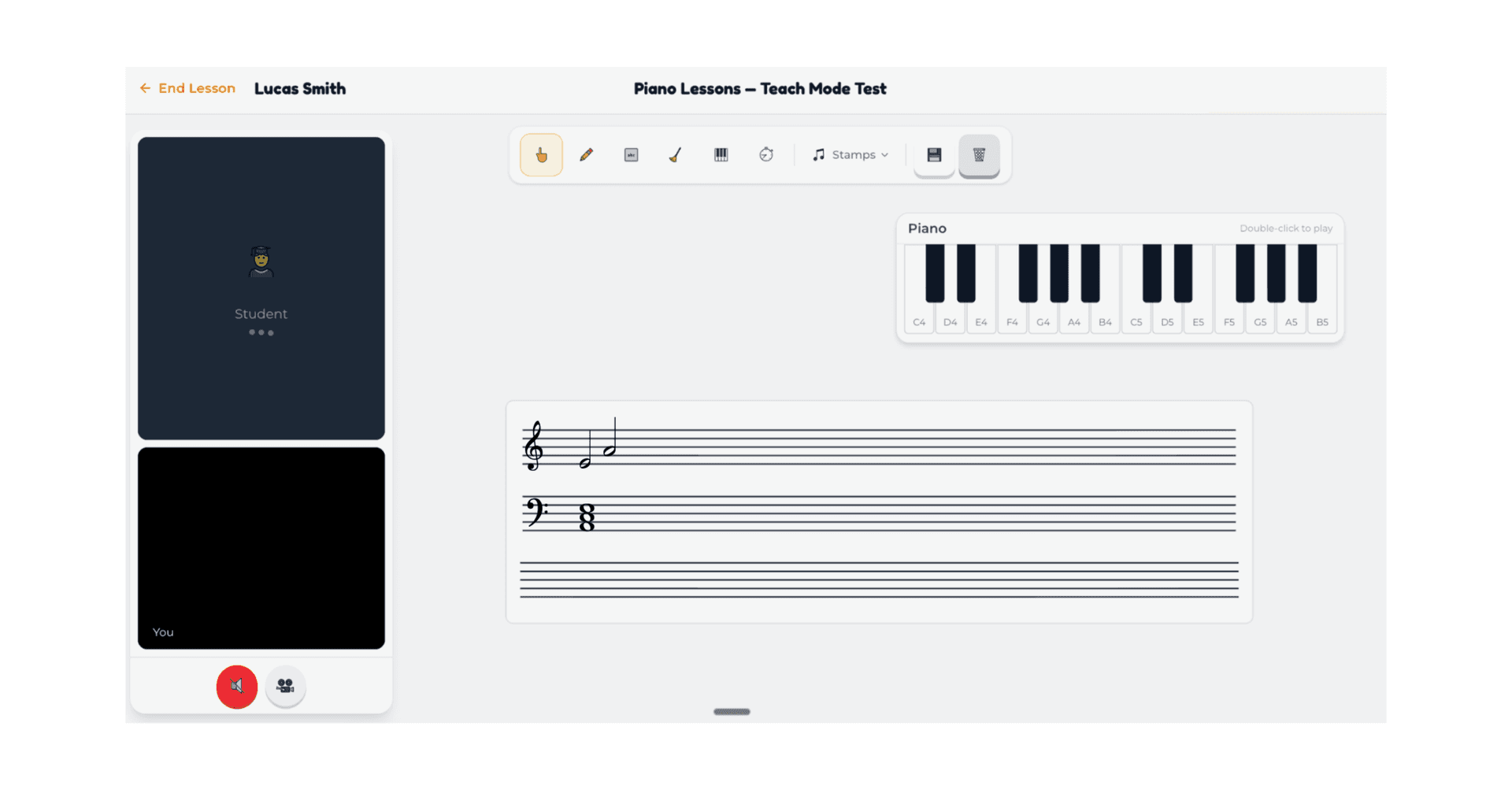
When the lesson starts, the family and teacher each open the lesson room from their dashboard. Live two-way video plus a shared whiteboard — notation, fingering diagrams, sketches, piano and metronome widgets, all collaborative in real time. No installation, no separate room link to track down.
- 3
Practice and homework between lessons
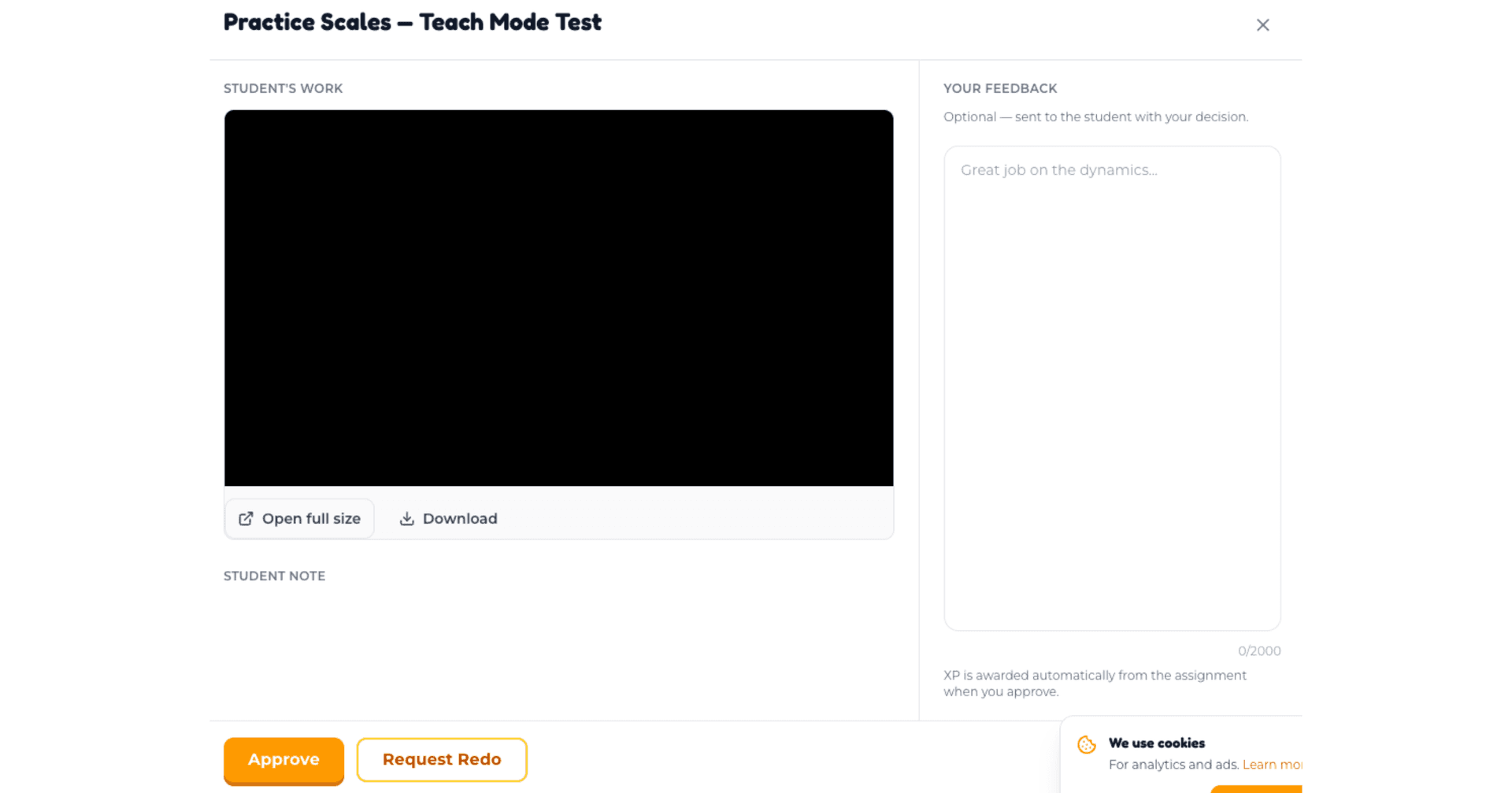
The teacher assigns homework to the student’s classroom — during the lesson or any time after. Homework lives in the classroom (a dashboard view both student and parent see) so it stays accessible all week. Students submit practice video, audio, or written responses; the teacher reviews before the next lesson.
For teachers: live whiteboard, homework, and student progress
TeachMode includes an online whiteboard for music lessons — a shared canvas inside the lesson room that both teacher and student draw on in real time. Drop in staff notation, sketch a fingering diagram, mark up a phrase the student just played, paste a screenshot of the score and circle the bar that needs work. No second-screen handoff. No texting photos of paper. Past whiteboards stay attached to the lesson, so the student can open last week's session at home and see exactly what the teacher marked.
Homework is assigned by the teacher (during the lesson or any time after) and lands in the student’s classroom — a dashboard view both student and parent see between lessons. Assign a scale, a passage, a recording prompt; the student finds it in the classroom, the parent sees the status on their dashboard. Students submit practice video, audio, or written responses from the same view. The teacher reviews submissions before the next lesson and walks in already knowing what landed and what did not. Practice cadence — who is consistent, who is slipping — surfaces at a glance through the XP system.
Independent teachers on Thoven now have live music lesson software powerful enough to run their entire roster, whether students came through the marketplace or arrived directly. The whiteboard, homework, parent dashboard, scheduling, and payment rails all work the same way regardless of how a teacher acquired the student. There is no separate premium tier for TeachMode and no upcharge for the whiteboard or parent view. The platform fee remains 8%, unchanged. TeachMode is included with every lesson — the lesson is what teachers and families are paying for, and TeachMode is what the lesson is.
Beyond the lesson room and the classroom, Thoven's operational suite — lesson scheduling, automatic reminders, payment collection, and student records — has been part of the platform from day one and runs the rest of a teaching practice. These are not new in TeachMode; they're the rails the lesson sits on, and TeachMode plugs into them. Teachers can see their full week at a glance, reschedule with a click, and look back at any past student's lesson history without searching through chat threads. The XP system runs in the background — teachers do not have to assign points manually; the platform tracks attendance, homework completion, and practice submissions and renders a streak view that students and parents can see. For a teacher running fifteen to twenty students a week, the time saved across reminders, billing, and lesson recap adds up quickly.
For parents: safety, COPPA, and visibility
For parents, the unlock is visibility without intrusion. The parent dashboard shows the lesson schedule, practice cadence, homework status, and the teacher's notes on what the child worked on — all on one page, all updated automatically. No sitting in on lessons, no relaying messages. If a homework is overdue or a practice week has been missed, that shows up too. The parent can be involved at the level they want — light-touch most weeks, hands-on when something needs attention — without chasing the teacher down for updates.
Safety on the platform is straightforward. Every Thoven teacher is background-checked and conservatory-trained — the standard since day one. The lesson room runs on COPPA-compliant infrastructure for students under 13, with parental consent and parent visibility built in by default. Thoven offers safe online music lessons as the foundation the rest of the platform is built on, not as a separate feature.
TeachMode is built so live online music lessons for children fit into the family's day with minimal lift. Sessions are timeboxed by booking. The XP system gives the child immediate feedback every week. The parent dashboard gives the grown-up a quiet, accurate read on how lessons are going. For older students — teenagers, adult learners — parent visibility scales down: the family decides how much they want to know, the teacher decides how much to share, and the platform stays out of the way.
On the parent dashboard itself: each child has their own view, the upcoming week's lessons are at the top, the homework tab shows what is currently assigned and what was submitted, and the progress section shows the XP streak and any teacher notes from recent lessons. Billing is in one place — parents can see what was charged for which lesson, change the card on file, and pause a teacher relationship if they need to take a season off. There is no separate parent portal to remember; everything lives on the same Thoven account the family uses for booking. For families with multiple students taking lessons, switching between kids is one tap.
TeachMode vs. video calls vs. apps
Families ask how TeachMode compares to generic video call tools (Zoom, FaceTime) and self-paced music apps (Simply Piano, Yousician). They are different categories, but families compare them. On online vs in-person music lessons, the online version has historically been a worse copy — missing the whiteboard, the notebook, the parent check-in at pickup. TeachMode closes those gaps. On online music lessons vs YouTube tutorials, the difference is direction: YouTube is broadcast, TeachMode is two-way with a real teacher watching, correcting, and assigning homework calibrated to the student. Video calls solve presence; apps solve self-paced practice; TeachMode is the lesson itself.
| TeachMode | Generic video call | Music apps | |
|---|---|---|---|
| Live human teacher |  | |  |
| Interactive whiteboard | | | |
| Personalized homework | | | partial |
| Parent visibility | | | partial |
| COPPA-compliant | |  | varies |
Frequently asked questions
What's next
TeachMode is launching today for every family and teacher already on Thoven, and is live for any new family signing up from this point forward. No waitlist, no separate enrollment, no premium add-on. Next quarter we are investing in richer homework media handling, expanding the XP framework with milestone-based achievements that move with the student across teachers and instruments, and continuing to invest in the audio path. If there is something the room cannot yet do, we want to hear about it.